


PAX Nav
3.633.00 Reviews
App Specs
- Version
- 6.1.2
- Updated On
- License
- Free
- Downloads
- 50,000+
- Developer
- ReedPop Mobile
- Categories
- Events
- Platform
- Android
Screenshots

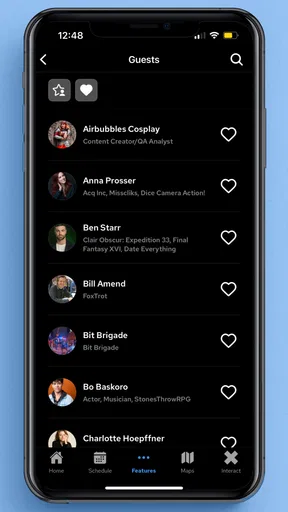

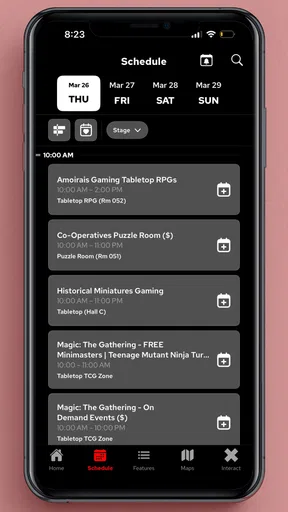


 Analysis by AppCompare
I installed PAX Nav expecting a straightforward event companion, and that is exactly where its value becomes clear. This free events app from ReedPop Mobile is built for people who are already going to a PAX gathering and need a more practical way to manage the day than a printed schedule, a browser tab, or a stream of screenshots. It is not trying to replace the event itself. Instead, it puts the information you are most likely to check while moving between queues, stages, meeting points, and crowded show-floor areas into one mobile space.
My experience was strongest when I treated it as a live reference tool rather than something to explore casually at home. The app’s short store description, “PAX Nav,” gives the right impression: navigation and event awareness are central to the experience. That makes connectivity an important part of using it well. When the app needs current event information, a dependable connection can make the difference between feeling prepared and standing in a busy venue wondering whether the screen in front of you is still showing the latest details.
Its overall rating sits at 3.6 from around 75 ratings, with roughly 33 written reviews, so the public response is mixed rather than universally enthusiastic. I think that is a fair signal. PAX Nav can be genuinely useful during a convention, but its usefulness depends on how carefully you prepare, how comfortable you are checking information on a phone, and how much you expect it to do beyond serving as an official event guide.
What PAX Nav is really useful for during a convention
The first thing I noticed is that this is an event-specific tool, not a general travel planner. A normal calendar app can remind me that I have a panel to attend, while a map app can help me reach the venue, but neither is designed around the shifting priorities of a PAX day. PAX Nav makes more sense once I am already thinking about sessions, activities, exhibitors, and the practical problem of deciding what to do next.
That distinction matters because convention schedules rarely stay mentally manageable for long. Before arriving, I might have a few sessions in mind. After entering the venue, those plans compete with queue times, unexpected discoveries, conversations with friends, and the simple fatigue of walking around. An official event app is useful here because it gives me a single place to revisit the event’s own information instead of relying on notes copied from several sources.
I would recommend installing it before leaving for the venue, not while standing at the entrance. That gives me time to open the app, understand its layout, look through the available event material, and decide which parts deserve attention. The practical benefit is small but important: I am less likely to spend the first few minutes of the day using a crowded network to figure out basic navigation.
One of my favorite ways to use an app like this is as a decision-making aid rather than a strict itinerary. I can identify one or two things I definitely want to see, then keep the rest flexible. That approach suits PAX better than building an overstuffed schedule. If a line is longer than expected or a friend suggests a different area, the app can help me reconsider the next move without forcing me to abandon the entire plan.
Worth Reading Before You Choose

EA SPORTS FC Mobile 26 Is a Bigger Football Game, but It Takes Time

Flipboard Shows What News Apps Must Do Beyond the Feed

Switching to Android Auto Means Rethinking Your Driving Routine

Google Calendar Makes a Crowded Week Easier to Manage

Ludo King Makes the Most of the Minutes Between Plans

Baby Panda World Brings Quick Play to Modern Phones, but Its Game Library Feels Busy
Why the network matters at the exact wrong moment
Connectivity becomes most important when the app is being used under pressure. At home, I can calmly browse event information. Inside a packed convention space, I am more likely to open PAX Nav because I need an answer immediately: where something is, what is happening next, or whether a particular stop still fits into the day. Those are the moments when a slow connection feels much more frustrating than it would in an ordinary app.
I do not treat the app as a guarantee that every screen will be available without a network connection. Instead, I prepare as if connectivity may be inconsistent. Before entering a crowded area, I review the information I expect to need soon and keep important details visible long enough to remember them. I also take a screenshot of genuinely critical information when that is practical, such as a meeting point or a session time. That is not a replacement for the app; it is a sensible backup for a busy day.
This workflow is especially useful for groups. If friends are splitting up, I can agree on a recognizable location and a rough time before everyone disappears into different queues. A phone-based event guide is much less helpful if the group assumes it can solve every coordination problem at the last minute. PAX Nav can support a plan, but it cannot remove the need to communicate clearly with the people I am attending with.
Another connectivity-related trade-off is freshness. Current event information is valuable precisely because it may change. That also means I prefer to check the app near the time I need the information instead of trusting a note made hours earlier. If I have already reviewed a schedule, I still take a quick look again before setting off. The extra check costs little and reduces the chance that I am acting on something I saw earlier in a different context.
Using it while walking, waiting, and sharing the day
PAX Nav makes the most sense on a phone because convention use is highly mobile. I am rarely sitting at a desk with time to compare several pages. I am walking, waiting in a line, or standing near a noisy hallway while trying to make a quick choice. That makes readable organization more important than decorative presentation. I want to reach the relevant information with as few taps and as little concentration as possible.
For that reason, I would avoid trying to plan every detail while moving. I check the app when I am stationary, then put the phone away while walking. This is both safer and more efficient. A short pause near the edge of a corridor gives me a better chance of reading the information correctly than attempting to navigate while surrounded by people moving in different directions.
A realistic example is a late-morning change of plans. I might leave one area with enough time for another activity, only to discover that the route is crowded and the group is moving slowly. Rather than opening a general search engine and sorting through unrelated results, I can use PAX Nav to reassess the event-specific options. If the app is reachable and the information is current, that short check helps me choose whether to continue, wait, or meet friends somewhere else.
The app is also useful for visitors who do not want to carry a paper schedule all day. Paper can be easy to lose, mark up, or crease in a bag. A phone is already part of most people’s convention routine, and the official app keeps the event reference in the same device used for messages and coordination. The downside is that the phone becomes more important, so I would arrive with enough battery for the day and avoid unnecessary screen use between checks.
People attending with children or less experienced convention visitors may appreciate the same central reference point, but I would not rely on the app alone. A simple verbal plan still helps: where to regroup, what to do if someone gets separated, and which parts of the event are priorities. PAX Nav can support those arrangements, but it is not a substitute for a meeting plan that works when nobody can immediately load a screen.
What happens when the app or connection does not cooperate
The main weakness of a connectivity-dependent event companion is not necessarily a dramatic crash. More often, the friction is a small delay at an inconvenient time. A page may take longer to appear, a refresh may be needed, or I may have to move to a less crowded spot before the phone behaves normally. In a quiet office, that is minor. In a queue that is moving or a group that is waiting, it can feel much more significant.
My recovery routine is deliberately simple. I stop moving, check whether the phone has a usable connection, and try again rather than repeatedly tapping several controls. If the information is important, I use a previously saved screenshot or a note containing the key detail. Then I return to the app when the connection improves so that I am not relying on an old backup longer than necessary.
This is also where expectations matter. I see PAX Nav as a guide that helps me make decisions, not as an authority that can resolve every change in real time. If something appears unclear, I would confirm it with event staff or the signage around me. Official branding makes the app a sensible first reference, but it does not mean I should ignore visible instructions at the venue.
When the app is slow, I also avoid switching repeatedly between it and other demanding apps. I close distractions, give the relevant screen a moment to load, and keep my phone brightness at a level that remains readable without draining the battery unnecessarily. These are ordinary phone habits, but they matter more at a convention because the device is doing several jobs at once: communication, photography, tickets or confirmations, and event research.
Users who dislike any dependence on mobile access may find this frustrating. A printed program or a downloaded personal schedule can feel more dependable for a small number of fixed plans. On the other hand, those alternatives become less convenient when I want to adapt. The trade-off is clear: PAX Nav offers a more flexible event reference, while offline personal notes offer more predictable access to a limited set of information.
How I would use it without wasting battery or mobile data
I do not need to keep PAX Nav open continuously. In fact, that would be a poor way to use it. I would check it before leaving the hotel or home, again when arriving, and then only when a specific decision requires it. This reduces screen time and keeps the app in its proper role as an on-demand reference rather than a background companion.
On a mobile connection, I would avoid repeatedly refreshing the same pages out of habit. If I have just checked a detail and nothing has changed in my plans, there is little benefit in reopening it every few minutes. I would also use venue Wi-Fi when it is convenient, while remembering that public networks can be busy and may not always be the fastest option. The best approach is to prepare important information before the busiest part of the day.
A useful habit is to divide information into “must know” and “nice to know.” Must-know details include the next planned activity, a group meeting point, and anything with a fixed time. Nice-to-know browsing can wait until I am seated or back in a quieter area. This keeps the app responsive in my own routine and prevents me from burning time and battery scrolling when I should be enjoying the event.
I would also keep the phone physically accessible but secure. Convention floors are crowded, and constantly holding a phone while walking creates both a distraction and an opportunity to drop it. I prefer checking PAX Nav near a wall or open area, putting the phone away, and then following the plan. That small change makes the experience feel less like managing a screen and more like using a tool when it is genuinely needed.
Because the app is free, there is no purchase decision standing between a visitor and trying it. That makes it easy to install alongside a personal calendar or notes app. Still, “free” does not mean costless in practice: it uses attention, battery, and potentially mobile data. I judge it favorably when I use it selectively, but I would not leave it running all day simply because there is no financial charge.
Who should choose PAX Nav, and who may prefer another approach?
I think PAX Nav is best for first-time PAX visitors, people attending several activities, and anyone who wants the official event context gathered in one mobile place. It is also useful for flexible planners who expect the day to change. If I arrive with only a broad idea of what I want to do, an event-focused app is more convenient than building a plan from scattered web pages.
It is less compelling for someone attending only one fixed appointment and leaving immediately afterward. In that case, a calendar reminder and a saved note may be enough. It may also be the wrong primary tool for visitors who strongly prefer paper schedules, do not want to depend on a phone connection, or have limited battery capacity. They can still install it as a secondary reference, but they should prepare another way to access the few details that matter most.
Compared with a general calendar, PAX Nav is more closely tied to the event environment. Compared with a map app, it is more relevant to what is happening at the convention rather than how to travel across a city. Compared with a web browser, it should feel more focused, although a browser remains a useful fallback if the app is temporarily inconvenient. I would use all three selectively rather than expecting one tool to handle every part of the trip.
The app is marked for Everyone, which fits its role as a general event utility rather than a niche specialist product. It runs on devices using at least Android or iOS version 10, and the current release is 6.1.2. Those details make compatibility worth checking before the event, especially if I am using an older phone that I normally keep for travel. I would rather discover a device issue at home than at the entrance.
ReedPop Mobile has kept the product focused on the official event companion role, and that focus is both its strength and its boundary. I do not expect it to replace messaging, navigation across the surrounding city, a battery pack, or a personal backup plan. Its job is narrower: help me interact with the PAX schedule and event information more conveniently while I am there.
My connectivity verdict after using it as a real event tool
My final view is positive, with sensible reservations. PAX Nav is worth installing if I am attending PAX and want a mobile reference that can adapt better than a handwritten itinerary. Its strongest moments come when I use it before a decision: checking what matters next, reviewing event information while stationary, and adjusting plans without searching through unrelated sources.
The connectivity angle keeps it from being a tool I would trust blindly. I prepare key details in advance, keep screenshots or notes for important moments, and avoid assuming that a busy venue will provide perfect access exactly when I need it. That is not a criticism unique to this app; it is the reality of using a live event guide in a dense public space. The app becomes much more reliable in practice when I give it a backup plan.
For me, the best workflow is simple: install it before arrival, explore it while relaxed, identify the day’s priorities, check current information near the relevant time, and close it when I am done. That approach preserves battery and attention while still taking advantage of the app’s event-specific focus. It also prevents the common mistake of turning a convention into a constant schedule-management exercise.
With over 50 thousand installs, PAX Nav is established enough to be a familiar choice for visitors looking for the official app, though its 3.6 average suggests that expectations should remain realistic. I would recommend it to anyone who wants extra structure and flexibility during a PAX day. I would skip making it my only source of information if I have strict offline needs, a very old device, or just one appointment to attend.
My recommendation: install PAX Nav as a prepared companion, not as your entire convention plan. Used that way, it can reduce the small logistical stresses that interrupt a good event experience while leaving room for the spontaneous discoveries that make attending in person worthwhile.
Pros
- Clear navigation interface with easy-to-read route guidance
- Useful for planning journeys before leaving home
- Supports location-based travel information
- Clean design that is simple for new users
- Can help reduce uncertainty during unfamiliar trips
Cons
- Accuracy may depend on current map and transport data
- Some features may require an active internet connection
- Coverage and usefulness can vary by location
- Background location use may affect battery life
- Not ideal if you need advanced offline navigation tools
FAQs for PAX Nav
What is PAX Nav and what is it used for?
PAX Nav is a navigation and travel-planning application designed to help users find routes, explore destinations, and access location-based travel information. Depending on the supported region and service configuration, it may provide maps, directions, points of interest, transport details, or other journey-planning tools. Before downloading, check whether its coverage and features match your country and daily travel needs.
Does PAX Nav work without an internet connection?
PAX Nav may require an active internet connection for features such as live maps, route updates, traffic information, location searches, and current travel data. Offline availability can vary by version, region, and the type of map or content offered. If you plan to use it while traveling, review its offline options carefully and download any supported resources before leaving reliable Wi-Fi.
Is PAX Nav free to download and use?
The application may be available to download at no initial cost, but some functions can depend on the provider, region, account type, or associated services. Users should check the official store listing for possible subscriptions, in-app purchases, usage fees, or charges connected with transportation and other third-party services. Always review the payment details before confirming an optional feature.
Which devices and permissions does PAX Nav require?
PAX Nav is intended for compatible Android or iOS devices, although exact operating-system requirements can change with future updates. Navigation apps commonly request access to location services, and some features may also use mobile data, notifications, Bluetooth, or background activity. Grant only the permissions you are comfortable with, and confirm that your phone meets the current store requirements before installing.
Can PAX Nav be trusted for important journeys or navigation decisions?
PAX Nav can be useful for planning and navigating, but it should not be treated as the only source of information during important or unfamiliar journeys. Map data, road conditions, schedules, restrictions, and location accuracy can change, while GPS signals may be affected by buildings or poor reception. Check signs and official travel updates, and keep an alternative plan available when accuracy is critical.


